首先需要封装一个海报组件
<template>
    <view class="up-poster">
        <!-- canvas用于绘制海报 -->
        <canvas v-if="state.showCanvas" class="up-poster__hidden-canvas" :canvas-id="state.canvasId"
            :id="state.canvasId"
            :style="{ width: state.canvasWidth + 'px', height: state.canvasHeight + 'px', fontFamily: 'Fira Sans' }">
        </canvas>
    </view>
</template>
<script setup lang="ts">
import Taro from '@tarojs/taro';
import { nextTick, reactive } from 'vue';

const { json } = defineProps<{ json: Record<string, any> }>();

const state = reactive({
    canvasId: 'poster-' + Date.now(),
    showCanvas: false,
    canvasWidth: 0,
    canvasHeight: 0,
});

defineExpose({
    exportImage
})


async function exportImage() {
    return new Promise(async (resolve, reject) => {
        try {
            // 获取海报尺寸信息
            const posterSize = json.css;
            // 将rpx转换为px
            const width = convertRpxToPx(posterSize.width || '750rpx');
            const height = convertRpxToPx(posterSize.height || '1114rpx');

            // 设置canvas尺寸
            state.canvasWidth = width;
            state.canvasHeight = height;
            state.showCanvas = true;

            // 等待DOM更新
            await nextTick();

            // 创建canvas上下文
            const ctx = Taro.createCanvasContext(state.canvasId);

            ctx.font = "'Fira Sans'";


            // 绘制背景
            if (posterSize.background) {
                // 支持渐变背景色
                if (posterSize.background.includes('linear-gradient') || posterSize.background.includes('radial-gradient')) {
                    drawGradientBackground(ctx, posterSize, 0, 0, width, height);
                } else {
                    ctx.setFillStyle(posterSize.background);
                    ctx.fillRect(0, 0, width, height);
                }
            }

            // 绘制所有元素
            for (const item of json.views) {
                await drawItem(ctx, item, width, height);
            }

            // 绘制到canvas
            ctx.draw(false, () => {
                nextTick(() => {
                    Taro.canvasToTempFilePath({
                        canvasId: state.canvasId,
                        success: (res) => {
                            // 隐藏canvas
                            state.showCanvas = false;
                            // 返回图片路径
                            resolve({
                                width: width,
                                height: height,
                                path: res.tempFilePath,
                                // H5下添加blob格式
                                blob: dataURLToBlob(res.tempFilePath)
                            });
                        },
                        fail: (err) => {
                            // 隐藏canvas
                            state.showCanvas = false;
                            reject(new Error('导出图片失败: ' + JSON.stringify(err)));
                        }
                    });
                })
            });

            // 超时处理
            setTimeout(() => {
                state.showCanvas = false;
                reject(new Error('导出图片超时'));
            }, 10000);
        } catch (error) {
            state.showCanvas = false;
            reject(error);
        }
    });
};

async function drawItem(ctx, item, canvasWidth, canvasHeight): Promise<void> {
    const css = item.css || {};
    const left = convertRpxToPx(css.left || '0rpx');
    const top = convertRpxToPx(css.top || '0rpx');
    const width = convertRpxToPx(css.width || '0rpx');
    const height = convertRpxToPx(css.height || '0rpx');

    switch (item.type) {
        case 'view':
            // 绘制矩形背景
            if (css.background) {
                // 支持渐变背景色
                if (css.background.includes('linear-gradient') || css.background.includes('radial-gradient')) {
                    drawGradientBackground(ctx, css, left, top, width, height);
                } else {
                    ctx.setFillStyle(css.background);
                    // 处理圆角
                    if (css.radius) {
                        const radius = convertRpxToPx(css.radius);
                        drawRoundRect(ctx, left, top, width, height, radius, css.background);
                    } else {
                        ctx.fillRect(left, top, width, height);
                    }
                }
            }
            break;

        case 'text':
            // 设置文本样式
            if (css.color) ctx.setFillStyle(css.color);
            if (css.fontSize) {
                const fontSize = convertRpxToPx(css.fontSize);
                ctx.setFontSize(fontSize);
            }
            ctx.setLineWidth(css?.fontWeight === 'bold' ? 10 : 50);

            // 处理文本换行
            if (css.lineClamp) {
                drawTextWithLineClamp(ctx, item.text, left, top, width, css);
            } else {
                const textBaseLine = css.fontSize ? convertRpxToPx(css.fontSize) / 2 : 10;
                ctx.fillText(item.text, left, top + textBaseLine);
            }
            break;

        case 'image':

            // 绘制图片
            return new Promise((resolve) => {
                Taro.getImageInfo({
                    src: item.src,
                    success: (res) => {
                        // 处理圆角
                        if (css.radius) {
                            const radius = convertRpxToPx(css.radius);
                            if (css.radiusArr) {
                                clipRoundRectByAll(ctx, left, top, width, height, radius, css.radiusArr[0], css.radiusArr[1], css.radiusArr[2], css.radiusArr[3]);
                            } else {
                                clipRoundRect(ctx, left, top, width, height, radius);
                            }

                        }
                        ctx.drawImage(res.path, left, top, width, height);
                        // 恢复剪切区域
                        ctx.restore();
                        resolve();
                    },
                    fail: () => {
                        // 图片加载失败时绘制占位符
                        ctx.setFillStyle('#f5f5f5');
                        ctx.fillRect(left, top, width, height);
                        resolve();
                    }
                });
            });


    }
}

function drawRoundRect(ctx, x, y, width, height, radius, fillColor) {
    ctx.save();
    ctx.beginPath();
    ctx.moveTo(x + radius, y);
    ctx.lineTo(x + width - radius, y);
    ctx.quadraticCurveTo(x + width, y, x + width, y + radius);
    ctx.lineTo(x + width, y + height - radius);
    ctx.quadraticCurveTo(x + width, y + height, x + width - radius, y + height);
    ctx.lineTo(x + radius, y + height);
    ctx.quadraticCurveTo(x, y + height, x, y + height - radius);
    ctx.lineTo(x, y + radius);
    ctx.quadraticCurveTo(x, y, x + radius, y);
    ctx.closePath();
    if (fillColor) {
        ctx.setFillStyle(fillColor);
        ctx.fill();
    }
    ctx.restore();
}

function clipRoundRect(ctx, x, y, width, height, radius) {
    ctx.save();
    ctx.beginPath();
    ctx.arc(x + radius, y + radius, radius, Math.PI, Math.PI * 1.5);
    ctx.lineTo(x + width - radius, y);
    ctx.arc(x + width - radius, y + radius, radius, Math.PI * 1.5, Math.PI * 2);
    ctx.lineTo(x + width, y + height - radius);
    ctx.arc(x + width - radius, y + height - radius, radius, 0, Math.PI * 0.5);
    ctx.lineTo(x + radius, y + height);
    ctx.arc(x + radius, y + height - radius, radius, Math.PI * 0.5, Math.PI);
    ctx.closePath();
    ctx.clip();
}

/**
 * 绘制半圆图片
 * @param ctx 上下文
 * @param x
 * @param y
 * @param width
 * @param height
 * @param radius
 */
function clipRoundRectByAll(ctx, x, y, width, height, radius, wn = true, en = true, ws = true, es = true) {
    ctx.save();
    ctx.beginPath();
    if (wn) {
        ctx.arc(x + radius, y + radius, radius, Math.PI, Math.PI * 1.5);
        ctx.lineTo(x + width - radius, y);
    } else {
        ctx.lineTo(x, y);
    }

    if (en) {
        ctx.arc(x + width - radius, y + radius, radius, Math.PI * 1.5, Math.PI * 2);
        ctx.lineTo(x + width, y + height - radius);
    } else {
        ctx.lineTo(x + width, y);
    }

    if (ws) {
        ctx.arc(x + width - radius, y + height - radius, radius, 0, Math.PI * 0.5);
        ctx.lineTo(x + radius, y + height);
    } else {
        ctx.lineTo(x + width, y + height);
    }

    if (es) {
        ctx.arc(x + radius, y + height - radius, radius, Math.PI * 0.5, Math.PI);
        ctx.closePath();
    } else {
        ctx.lineTo(x, y + height);

        ctx.closePath();
    }
    ctx.clip();
}

function drawTextWithLineClamp(ctx, text, x, y, maxWidth, css) {
    const lineClamp = parseInt(css.lineClamp) || 1;
    const lineHeight = css.lineHeight ? convertRpxToPx(css.lineHeight) : 20;
    const lines: string[] = [];
    let currentLine = '';

    for (let i = 0; i < text.length; i++) {
        const char = text[i];
        const testLine = currentLine + char;
        const metrics = ctx.measureText(testLine);

        if (metrics.width > maxWidth && currentLine !== '') {
            lines.push(currentLine);
            currentLine = char;

            // 如果已达最大行数,添加省略号并结束
            if (lines.length === lineClamp) {
                if (metrics.width > maxWidth) {
                    // 添加省略号
                    let fitLine = currentLine.substring(0, currentLine.length - 1);
                    while (ctx.measureText(fitLine + '...').width > maxWidth && fitLine.length > 0) {
                        fitLine = fitLine.substring(0, fitLine.length - 1);
                    }
                    console.log('last line char', lines[lines.length - 1])
                    // lines[lines.length - 1] = fitLine + '...';
                }
                break;
            }
        } else {
            currentLine = testLine;
        }

        // 处理最后一行
        if (i === text.length - 1 && lines.length < lineClamp) {
            lines.push(currentLine);
        }
    }

    // 绘制每一行
    for (let i = 0; i < lines.length; i++) {
        // 修复:正确计算文本垂直位置
        const textBaseLine = css.fontSize ? convertRpxToPx(css.fontSize) / 2 : 10;
        ctx.fillText(lines[i], x, y + (i * lineHeight) + textBaseLine);
    }
}

function convertRpxToPx(rpxValue) {
    if (typeof rpxValue === 'number') return rpxValue;

    // 使用uni-app自带的Taro.rpx2px方法
    if (typeof rpxValue === 'string' && rpxValue.endsWith('rpx')) {
        const value = parseFloat(rpxValue);
        return value;
    }

    return parseFloat(rpxValue) || 0;
}

function drawGradientBackground(ctx, css, left, top, width, height) {
    const background = css.background;
    let gradient: null | CanvasGradient = null;

    // 处理线性渐变
    if (background.includes('linear-gradient')) {
        // 解析线性渐变角度和颜色
        const angleMatch = background.match(/linear-gradient\((\d+)deg/);
        const angle = angleMatch ? parseInt(angleMatch[1]) : 135;

        // 根据角度计算渐变起点和终点
        let startX = left, startY = top, endX = left + width, endY = top + height;

        // 简化的角度处理(支持常见角度)
        if (angle === 0) {
            startX = left;
            startY = top + height;
            endX = left;
            endY = top;
        } else if (angle === 90) {
            startX = left;
            startY = top;
            endX = left + width;
            endY = top;
        } else if (angle === 180) {
            startX = left;
            startY = top;
            endX = left;
            endY = top + height;
        } else if (angle === 270) {
            startX = left + width;
            startY = top;
            endX = left;
            endY = top;
        }

        gradient = ctx.createLinearGradient(startX, startY, endX, endY);

        // 解析颜色值
        const colorMatches = background.match(/#[0-9a-fA-F]+|rgba?\([^)]+\)/g);
        if (colorMatches && colorMatches.length >= 2) {
            // 添加渐变色点
            colorMatches.forEach((color, index) => {
                const stop = index / (colorMatches.length - 1);
                gradient?.addColorStop(stop, color);
            });
        }
    }
    // 处理径向渐变
    else if (background.includes('radial-gradient')) {
        // 径向渐变从中心开始
        const centerX = left + width / 2;
        const centerY = top + height / 2;
        const radius = Math.min(width, height) / 2;

        gradient = ctx.createRadialGradient(centerX, centerY, 0, centerX, centerY, radius);

        // 解析颜色值
        const colorMatches = background.match(/#[0-9a-fA-F]+|rgba?\([^)]+\)/g);
        if (colorMatches && colorMatches.length >= 2) {
            // 添加渐变色点
            colorMatches.forEach((color, index) => {
                const stop = index / (colorMatches.length - 1);
                gradient.addColorStop(stop, color);
            });
        }
    }

    if (gradient) {
        ctx.setFillStyle(gradient);
        // 处理圆角
        if (css.radius) {
            const radius = convertRpxToPx(css.radius);
            drawRoundRect(ctx, left, top, width, height, radius, gradient);
        } else {
            ctx.fillRect(left, top, width, height);
        }
    }
}

function dataURLToBlob(dataURL) {
    // 检查是否为H5环境且是base64数据
    // #ifdef H5
    if (dataURL && dataURL.startsWith('data:image')) {
        const parts = dataURL.split(';base64,');
        const contentType = parts[0].split(':')[1];
        const raw = window.atob(parts[1]);
        const rawLength = raw.length;
        const uInt8Array = new Uint8Array(rawLength);

        for (let i = 0; i < rawLength; ++i) {
            uInt8Array[i] = raw.charCodeAt(i);
        }

        return new Blob([uInt8Array], { type: contentType });
    }
    // #endif

    return null;
}

</script>
使用(我这里为了快速实现就没有优化代码,后续你们自己按需求优化吧)
<template>
  <view>
    <Image :src="state.posterImageUrl" style="width: 100%;" mode="widthFix" />
    <Button @click="click">生成海报</Button>
    <Poster :json="state.posterConfig" ref="posterRef" />
  </view>
</template>
<script setup lang="ts">
import Poster from '@/components/poster/index.vue'
import { computed, reactive, ref } from 'vue';
import { Button } from '@nutui/nutui-taro';
import Taro from '@tarojs/taro';
import { Image } from '@tarojs/components';
import { getMiniQrCode } from '@/api/utils';


definePageConfig({
  navigationBarTitleText: "礼品集",
});

const baseFileUrl = '你的服务器地址'

const posterRef = ref();

const canvasCss = {
  width: 390,
  height: 770,
  // background: 'linear-gradient(135deg,#fce38a,#f38181)',
  background: '#F6F6F6',
}

const topImgCss = computed(() => {
  return {
    position: 'absolute',
    left: 0,
    top: 0,
    width: canvasCss.width,
    height: canvasCss.width * 0.6,
  }
});


const textCardCss = computed(() => {
  return {
    position: 'absolute',
    left: 20,
    top: topImgCss.value.height - 20,
    background: '#fff',
    radius: 15,
    width: topImgCss.value.width - 40,
    height: topImgCss.value.width * 0.42,
    shadow: '0 20rpx 48rpx rgba(0,0,0,.05)'
  }
});

const textCss = computed(() => {
  return {
    position: 'absolute',
    lineClamp: 10,
    width: textCardCss.value.width - 40,
    color: '#333',
    left: textCardCss.value.left + 20,
    top: textCardCss.value.top + 30,
    fontSize: 16,
    lineHeight: 25,
  }
});

const titleLineLeft = computed(() => {
  return {
    position: 'absolute',
    left: 20,
    top: textCardCss.value.top + textCardCss.value.height + 20,
    width: topImgCss.value.width * 0.3,
    height: 5,
  }
});


const titleLineRight = computed(() => ({
  position: 'absolute',
  left: canvasCss.width - 20 - (topImgCss.value.width * 0.3),
  top: textCardCss.value.top + textCardCss.value.height + 20,
  width: topImgCss.value.width * 0.3,
  height: 5,
}))

const titleCss = computed(() => ({
  color: '#333',
  width: canvasCss.width - 40 - (titleLineLeft.value.width * 2),
  left: titleLineLeft.value.left + titleLineLeft.value.width + 20,
  top: titleLineLeft.value.top,
  fontSize: 14,
  lineHeight: 20,
}));

const goodsCardWidth = computed(() => {
  return (textCardCss.value.width - 20) / 3
});


const goodsCardHeight = computed(() => {
  return textCardCss.value.height * 0.9
});


const goods1 = [
  {
    type: 'view',
    css: {
      left: 20,
      top: titleCss.value.top + 20,
      background: '#fff',
      radius: 15,
      width: goodsCardWidth.value,
      height: goodsCardHeight.value,
      shadow: '0 20rpx 48rpx rgba(0,0,0,.05)'
    }
  },
  // 第一张图
  {
    type: 'image',
    src: baseFileUrl + 'web/upload/20251107/98049112296914945.jpg',
    css: {
      left: 20,
      top: titleCss.value.top + 20,
      width: goodsCardWidth.value,
      height: goodsCardHeight.value * 0.55,
      radius: 10,
      radiusArr: [true, true, false, false]
    }
  },
  {
    type: 'text',
    text: '共 12 款礼品共 12 款礼品共 12 款礼品共 12 款礼品共 12 款礼品共 12 款礼品共 12 款礼品',
    css: {
      color: '#333',
      width: goodsCardWidth.value - 10,
      left: 25,
      top: titleCss.value.top + 20 + (goodsCardHeight.value * 0.55) + 12,
      fontSize: 12,
      lineHeight: 15,
      lineClamp: 2
    }
  },
  {
    type: 'text',
    text: '¥999.99元',
    css: {
      color: '#FF0000',
      width: goodsCardWidth.value - 10,
      left: 25,
      top: titleCss.value.top + 20 + (goodsCardHeight.value * 0.5) + 10 + 45,
      fontSize: 14,
      lineHeight: 18,
      lineClamp: 1
    }
  },
];


const goods2 = [
  {
    type: 'view',
    css: {
      left: 20 + goodsCardWidth.value + 10,
      top: titleCss.value.top + 20,
      background: '#fff',
      radius: 15,
      width: goodsCardWidth.value,
      height: goodsCardHeight.value,
      shadow: '0 20rpx 48rpx rgba(0,0,0,.05)'
    }
  },
  // 第二张图
  {
    type: 'image',
    src: baseFileUrl + 'web/upload/20251107/98049112296914945.jpg',
    css: {
      left: 20 + goodsCardWidth.value + 10,
      top: titleCss.value.top + 20,
      width: goodsCardWidth.value,
      height: goodsCardHeight.value * 0.55,
      radius: 10,
      radiusArr: [true, true, false, false]
    }
  },
  {
    type: 'text',
    text: '共 12 款礼品共 12 款礼品共 12 款礼品共 12 款礼品共 12 款礼品共 12 款礼品共 12 款礼品',
    css: {
      color: '#333',
      width: goodsCardWidth.value - 10,
      left: 25 + goodsCardWidth.value + 10,
      top: titleCss.value.top + 20 + (goodsCardHeight.value * 0.55) + 12,
      fontSize: 12,
      lineHeight: 15,
      lineClamp: 2
    }
  },
  {
    type: 'text',
    text: '¥999.99元',
    css: {
      color: '#FF0000',
      width: goodsCardWidth.value - 10,
      left: 25 + goodsCardWidth.value + 10,
      top: titleCss.value.top + 20 + (goodsCardHeight.value * 0.5) + 10 + 45,
      fontSize: 14,
      lineHeight: 18,
      lineClamp: 1
    }
  },
]

const goods3 = [
  {
    type: 'view',
    css: {
      left: 20 + (goodsCardWidth.value * 2) + 20,
      top: titleCss.value.top + 20,
      background: '#fff',
      radius: 15,
      width: goodsCardWidth.value,
      height: goodsCardHeight.value,
      shadow: '0 20rpx 48rpx rgba(0,0,0,.05)'
    }
  },
  // 第三张图
  {
    type: 'image',
    src: baseFileUrl + 'web/upload/20251107/98049112296914945.jpg',
    css: {
      left: 20 + (goodsCardWidth.value * 2) + 20,
      top: titleCss.value.top + 20,
      width: goodsCardWidth.value,
      height: goodsCardHeight.value * 0.55,
      radius: 10,
      radiusArr: [true, true, false, false]
    }
  },
  {
    type: 'text',
    text: '共 12 款礼品共 12 款礼品共 12 款礼品共 12 款礼品共 12 款礼品共 12 款礼品共 12 款礼品',
    css: {
      color: '#333',
      width: goodsCardWidth.value - 10,
      left: 25 + (goodsCardWidth.value * 2) + 20,
      top: titleCss.value.top + 20 + (goodsCardHeight.value * 0.55) + 12,
      fontSize: 12,
      lineHeight: 15,
      lineClamp: 2
    }
  },
  {
    type: 'text',
    text: '¥999.99元',
    css: {
      color: '#FF0000',
      width: goodsCardWidth.value - 10,
      left: 25 + (goodsCardWidth.value * 2) + 20,
      top: titleCss.value.top + 20 + (goodsCardHeight.value * 0.5) + 10 + 45,
      fontSize: 14,
      lineHeight: 18,
      lineClamp: 1
    }
  },
]


const goods4 = [
  {
    type: 'view',
    css: {
      left: 20,
      top: titleCss.value.top + 20 + goodsCardHeight.value + 20,
      background: '#fff',
      radius: 15,
      width: goodsCardWidth.value,
      height: goodsCardHeight.value,
      shadow: '0 20rpx 48rpx rgba(0,0,0,.05)'
    }
  },
  // 第三张图
  {
    type: 'image',
    src: baseFileUrl + 'web/upload/20251107/98049112296914945.jpg',
    css: {
      left: 20,
      top: titleCss.value.top + 20 + goodsCardHeight.value + 20,
      width: goodsCardWidth.value,
      height: goodsCardHeight.value * 0.55,
      radius: 10,
      radiusArr: [true, true, false, false]
    }
  },
  {
    type: 'text',
    text: '共 12 款礼品共 12 款礼品共 12 款礼品共 12 款礼品共 12 款礼品共 12 款礼品共 12 款礼品',
    css: {
      color: '#333',
      width: goodsCardWidth.value - 10,
      left: 25,
      top: titleCss.value.top + 20 + goodsCardHeight.value + 20 + (goodsCardHeight.value * 0.55) + 12,
      fontSize: 12,
      lineHeight: 15,
      lineClamp: 2
    }
  },
  {
    type: 'text',
    text: '¥999.99元',
    css: {
      color: '#FF0000',
      width: goodsCardWidth.value - 10,
      left: 25,
      top: titleCss.value.top + 20 + goodsCardHeight.value + 20 + (goodsCardHeight.value * 0.5) + 10 + 45,
      fontSize: 14,
      lineHeight: 18,
      lineClamp: 1
    }
  },
]

const goods5 = [
  {
    type: 'view',
    css: {
      left: 20 + goodsCardWidth.value + 10,
      top: titleCss.value.top + 20 + goodsCardHeight.value + 20,
      background: '#fff',
      radius: 15,
      width: goodsCardWidth.value,
      height: goodsCardHeight.value,
      shadow: '0 20rpx 48rpx rgba(0,0,0,.05)'
    }
  },
  // 第二张图
  {
    type: 'image',
    src: baseFileUrl + 'web/upload/20251107/98049112296914945.jpg',
    css: {
      left: 20 + goodsCardWidth.value + 10,
      top: titleCss.value.top + 20 + goodsCardHeight.value + 20,
      width: goodsCardWidth.value,
      height: goodsCardHeight.value * 0.55,
      radius: 10,
      radiusArr: [true, true, false, false]
    }
  },
  {
    type: 'text',
    text: '共 12 款礼品共 12 款礼品共 12 款礼品共 12 款礼品共 12 款礼品共 12 款礼品共 12 款礼品',
    css: {
      color: '#333',
      width: goodsCardWidth.value - 10,
      left: 25 + goodsCardWidth.value + 10,
      top: titleCss.value.top + 20 + goodsCardHeight.value + 20 + (goodsCardHeight.value * 0.55) + 12,
      fontSize: 12,
      lineHeight: 15,
      lineClamp: 2
    }
  },
  {
    type: 'text',
    text: '¥999.99元',
    css: {
      color: '#FF0000',
      width: goodsCardWidth.value - 10,
      left: 25 + goodsCardWidth.value + 10,
      top: titleCss.value.top + 20 + goodsCardHeight.value + 20 + (goodsCardHeight.value * 0.5) + 10 + 45,
      fontSize: 14,
      lineHeight: 18,
      lineClamp: 1
    }
  },
]

const goods6 = [
  {
    type: 'view',
    css: {
      left: 20 + (goodsCardWidth.value * 2) + 20,
      top: titleCss.value.top + 20 + goodsCardHeight.value + 20,
      background: '#fff',
      radius: 15,
      width: goodsCardWidth.value,
      height: goodsCardHeight.value,
      shadow: '0 20rpx 48rpx rgba(0,0,0,.05)'
    }
  },
];


const state = reactive({
  posterImageUrl: '',
  posterConfig: {
    css: canvasCss,
    views: [
      // 商品图片
      {
        type: 'image',
        // H5下图片域名要注意允许跨域
        src: baseFileUrl + 'web/upload/20251209/102664284655321089.jpg',
        css: topImgCss.value
      },
      // 背景卡片
      {
        type: 'view',
        css: textCardCss.value
      },
      {
        type: 'text',
        text: '情人节,又称圣瓦伦丁节或圣华伦泰节,日期在每年公历的2月14日,是西方国家的传统节日之一,起源于基督教。如今已经成为全世界著名的浪漫节日,但是不同国家的人们表达爱意的方式却各不相同。',
        css: textCss.value
      },
      // 礼品数量
      {
        type: 'image',
        src: baseFileUrl + 'web/upload/20251212/103078939370455041.png',
        css: titleLineLeft.value
      },
      {
        type: 'image',
        src: baseFileUrl + 'web/upload/20251212/103078939370455041.png',
        css: titleLineRight.value
      },
      {
        type: 'text',
        text: '情人节,又称圣瓦伦丁节或圣华伦泰节,日期在每年公历的2月14日,是西方国家的传统节日之一,起源于基督教。如今已经成为全世界著名的浪漫节日,但是不同国家的人们表达爱意的方式却各不相同。',
        css: textCss.value
      },
      {
        type: 'text',
        text: '共 12 款礼品',
        css: titleCss.value
      },
      // 商品
      ...goods1,
      ...goods2,
      ...goods3,
      ...goods4,
      ...goods5,
      ...goods6,

    ]
  }
});

async function click() {
  try {
    const qrcode = await getMiniQrCode();
    console.log('qrcode', qrcode)
    Taro.showLoading({
      title: '海报生成中...'
    });

    // 调用海报组件的导出方法
    const result = await posterRef.value.exportImage();
    state.posterImageUrl = result.path;
    console.log('draw img info', result)


    await Taro.saveImageToPhotosAlbum({
      filePath: result.path,
    })
    Taro.hideLoading();
    Taro.showToast({
      title: '海报生成成功',
      icon: 'success'
    });
  } catch (error) {
    Taro.hideLoading();
    Taro.showToast({
      title: '海报生成失败',
      icon: 'none'
    });
    console.error('海报生成失败:', error);
  }


}


</script>
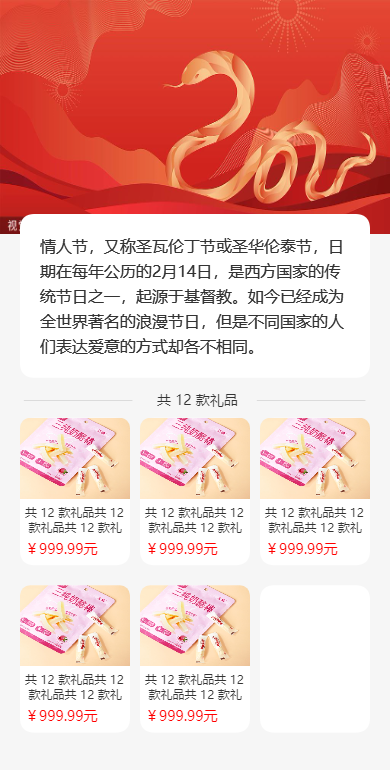
效果